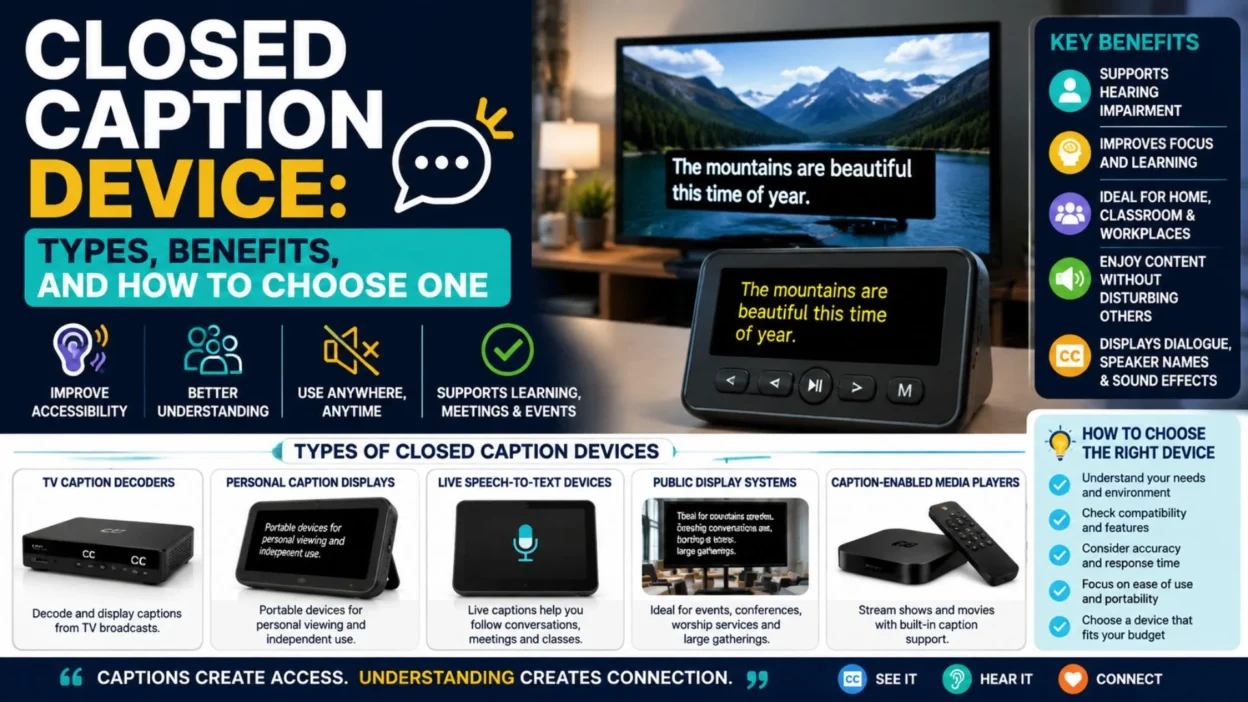
plays, personal captioning systems, television caption decoders, and speech-to-text devices. The right option depends on where you plan to use it and how accurate, portable, or customizable the captions need to be.
This guide explains how closed caption devices work, the main types available, useful features, common limitations, and practical ways to choose one. It also explains the difference between a caption device and the closed caption setting already built into many modern screens.
What Is a Closed Caption Device?
A closed caption device receives caption information and presents it as readable text. Depending on the system, it may display dialogue, speaker changes, sound effects, or other important audio details.
Closed captions are different from ordinary subtitles because they can include information beyond spoken words. For example, captions may identify music, laughter, applause, or a ringing phone.
A device may use captions supplied by a video source or create them through speech recognition.
Common functions include:
- Displaying spoken dialogue as text. 📝
- Showing important non-speech sounds. 🔊
- Identifying different speakers. 👥
- Presenting captions on a separate screen. 📺
- Converting live speech into text. 🎤
- Allowing viewers to adjust text size and contrast. 🔠
- Supporting personal viewing without changing the main screen. 🎧
- Improving access to meetings, lessons, and public events. 🏫
How Does a Closed Caption Device Work?
The device works by receiving caption data or converting speech into text. The exact process depends on whether the captions are prerecorded or generated live.
For television and streaming content, captions may come directly from the broadcaster, streaming service, or media player. For live speech, a microphone and captioning software may create text in real time.
Basic captioning process
Audio or video source → caption data or speech recognition → caption display
A television may decode embedded caption data. A personal device may receive text through an internet connection. A live captioning system may use automatic speech recognition or a human captioner.
The result is text that appears on a screen, monitor, mobile device, or dedicated display.
Main Types of Closed Caption Devices
Different environments require different captioning solutions. A television viewer may need a built-in decoder, while a meeting attendee may prefer a personal speech-to-text display.
Television caption devices
These devices display captions from broadcast or cable programming. Many modern televisions already include caption functionality, so a separate decoder may not be necessary.
Older televisions may require an external caption decoder or compatible receiver.
Personal captioning devices
Personal systems display captions on a small screen, tablet, smartphone, or dedicated monitor. They are useful when one person needs captions without affecting other viewers.
Live speech-to-text devices
These systems convert spoken language into text during conversations, meetings, appointments, and presentations. Some use automatic speech recognition, while others connect to professional captioning services.
Public display caption systems
These systems show captions on a larger screen during conferences, classrooms, religious services, performances, and public announcements.
Caption-enabled media players
Some media players and streaming devices decode caption tracks and allow users to change the appearance of the text.
Closed Caption Device vs. Built-In Caption Settings
Many people assume they need a separate device to access closed captions. In many cases, the television, streaming player, or computer already has the required feature.
A built-in caption setting uses the device’s existing software. A separate caption device may offer more flexibility, a larger display, or personal access.
FeatureBuilt-in caption settingSeparate caption deviceSetupUsually simpleMay require extra equipmentCostOften includedMay involve additional costDisplayMain screenPersonal or separate screenPortabilityDepends on the main deviceOften easier to moveCustomizationVaries by platformMay offer more optionsLive conversation supportUsually limitedOften available on specialist systems
A separate device is most useful when built-in captions do not meet the viewer’s needs.
Benefits of Using a Closed Caption Device
Captioning can make spoken content easier to follow. It also gives viewers more control over how they access information.
Key benefits
- Makes dialogue easier to understand. 👂
- Supports viewers with hearing loss. 🤝
- Helps in noisy environments. 🚆
- Makes videos easier to follow at low volume. 🔇
- Supports language learners who read while listening. 📚
- Helps viewers understand unfamiliar names and terms. 🔎
- Provides access to live discussions and presentations. 🎤
- Allows personal caption viewing in shared spaces. 📱
- Improves clarity when audio quality is poor. 🎧
- Makes important sound effects visible through text. 🎬
Captions are not a replacement for every accessibility service. However, they can be an important part of an accessible viewing experience.
Closed Caption Devices for Television
Television caption devices are designed to display text while a program plays. Depending on the source, captions may be available through broadcast signals, cable services, streaming applications, or media files.
Features to check
- Compatibility with your television. 📺
- Support for the caption format used by your content source. 🔧
- Easy access to caption controls. 🎛️
- Adjustable text size and style. 🔠
- Background and contrast options. 🌓
- Support for multiple languages when available. 🌍
- Reliable connection to the video source. 🔌
- A simple remote-control experience. 🎮
Before buying an external decoder, check whether your television already supports closed captions. You may only need to activate the feature in the accessibility or settings menu.
Closed Caption Devices for Streaming
Streaming platforms may offer captions through their own applications. The available controls can differ by service, device, and content title.
A streaming caption device may be useful when the viewer wants captions on a separate screen or needs more control than the television provides.
Important streaming considerations
- Confirm that the streaming service offers captions for the selected content. 📺
- Check whether captions are available on your device. 🔍
- Review text-size and display settings. 🔠
- Test captions before watching an important program. ✅
- Check whether captions remain available after an app update. 🔄
- Make sure the internet connection is stable for live caption services. 🌐
Caption availability is not always the same across every program. A device can display captions only when the source provides them or when a live captioning system generates them.
Live Caption Devices for Meetings
Live caption devices can convert spoken conversation into text during meetings and group discussions. They may use a phone, tablet, laptop, dedicated display, or professional captioning system.
These tools can be useful in offices, classrooms, interviews, and community events.
Useful features for meetings
- Real-time speech-to-text conversion. 🎤
- A readable display for individual users. 📱
- Support for multiple speakers. 👥
- Punctuation and sentence formatting. ✍️
- A way to correct or review text. 📝
- Adjustable text size. 🔠
- Microphone support. 🎙️
- Internet access when required. 🌐
- Export or transcript options when appropriate. 📄
- Privacy controls for sensitive discussions. 🔒
Automatic captions may contain errors, especially when people speak quickly, interrupt one another, or use technical terms. For important meetings, professional captioning may provide greater accuracy.
Closed Caption Devices for Classrooms
Students may use captioning devices to follow lessons, videos, discussions, and presentations. Teachers can also use captions to support different learning needs.
A classroom solution should be easy to operate and should not distract from the lesson.
Classroom considerations
- The display should be readable from the student’s position. 👀
- Captions should appear with minimal delay. ⏱️
- The system should work with classroom audio equipment. 🔊
- Teachers should know how to activate and adjust captions. 🧑🏫
- The device should support the lesson’s language. 🌍
- Important terminology should be checked for accuracy. 📚
- Students should have a clear way to report captioning problems. 💬
Captions can support access, but they should be combined with other classroom accommodations when needed.
Closed Caption Devices for Public Events
Large events may use caption displays to make speeches, presentations, and performances easier to follow. Captions can appear on a projection screen, LED display, monitor, or personal device.
Common event uses
- Conferences and seminars. 🎤
- Graduation ceremonies. 🎓
- Public meetings. 🏛️
- Theater performances. 🎭
- Religious services. 🕊️
- Corporate presentations. 💼
- Community gatherings. 🤝
- Training sessions. 📚
Event organizers should test the microphone, display, caption software, and internet connection before the event begins.
Automatic Captions vs. Human Captioning
A closed caption device may use automatic speech recognition or receive text from a human captioner. Both approaches have advantages and limitations.
Automatic captioning
Automatic systems create captions through speech recognition. They are often convenient and can work without a dedicated captioner.
However, accuracy may decrease when there is background noise, overlapping speech, accents, poor microphones, or specialized vocabulary.
Human captioning
A professional captioner listens to the speaker and creates accurate text. Human captioning is often preferred for legal, educational, medical, or high-stakes settings.
It may cost more and require advance scheduling. Still, it can provide better handling of names, technical language, and complex conversations.
Features to Look for in a Closed Caption Device
The best device depends on the viewer’s needs, the content source, and the environment. A feature checklist can make the buying decision easier.
Display quality
Choose a display that is sharp, readable, and large enough for the intended viewing distance.
Text customization
Look for controls for font size, text color, background color, spacing, and contrast.
Caption accuracy
For live captioning, consider whether the system uses automatic recognition or professional captioners.
Delay
A small delay may be acceptable for recorded content. Live conversations usually require captions that appear quickly.
Compatibility
Check compatibility with your television, computer, smartphone, microphone, streaming service, or event equipment.
Portability
A portable device may be better for travel, appointments, meetings, and shared spaces.
Connectivity
Some devices work offline, while others need Wi-Fi, Bluetooth, mobile data, or a connection to a media source.
Privacy
Review how the device handles audio, transcripts, recordings, and cloud processing. This matters especially during private conversations.
Ease of use
A simple interface is important for users who do not want to manage complicated settings.
How to Choose the Right Device
Start by identifying the situation in which captions are needed. A television viewer may need a different solution from someone attending live meetings.
Consider these questions
- Do you need captions for television, streaming, or live speech? 📺
- Will one person use the device or a whole audience? 👤
- Do you need a personal display? 📱
- Is live captioning necessary? 🎤
- How important is caption accuracy? 🎯
- Will the device work with your existing equipment? 🔌
- Do you need adjustable text and contrast? 🔠
- Is portability important? 🧳
- Will the device be used in private or public settings? 🔒
- Does the device fit your budget and technical comfort level? 💳
The right choice is the one that solves the actual access problem without adding unnecessary complexity.
How to Set Up a Closed Caption Device
Setup varies by device, but most systems follow a similar process.
General setup steps
- Read the manufacturer’s compatibility requirements. 📘
- Connect the device to the required screen or audio source. 🔌
- Install the necessary application or software. 💻
- Connect to Wi-Fi or another required network. 🌐
- Activate captions in the device settings. ⚙️
- Select the preferred language. 🌍
- Adjust font size, color, and contrast. 🔠
- Test the device with real content. ▶️
- Check the caption delay and accuracy. ⏱️
- Save the settings for future use. 💾
If captions do not appear, check the source content first. The problem may be that captions are unavailable rather than a fault in the device.
Common Problems and Troubleshooting
Caption devices can experience technical issues. Many problems are caused by settings, compatibility, audio quality, or unavailable caption data.
Captions are not appearing
Check whether captions are available for the program or service. Then confirm that the caption feature is enabled.
Captions are delayed
Live captions may have a short delay. A weak internet connection, slow processing, or poor audio input can increase it.
Captions contain errors
Reduce background noise, move the microphone closer to the speaker, and check the selected language. Technical words may still need manual correction.
Text is difficult to read
Increase the font size, improve contrast, or change the caption background.
The device will not connect
Check cables, Bluetooth pairing, Wi-Fi access, software permissions, and device compatibility.
Captions stop during playback
Restart the application, check the network, and confirm that the content still offers captions.
Closed Captions, Subtitles, and Transcripts
These terms are related, but they are not identical.
Closed captions
Closed captions can be turned on or off. They may include dialogue and meaningful audio information.
Open captions
Open captions are permanently displayed on the video. Viewers usually cannot turn them off.
Subtitles
Subtitles generally focus on spoken dialogue. They may be designed for viewers who understand the language but need translated text.
Transcripts
A transcript is a written version of spoken content. It may be provided separately from the video and is not necessarily synchronized with playback.
Understanding these differences helps you choose the right accessibility format.
Accessibility and Privacy Considerations
A caption device should support the user without collecting more information than necessary. This is especially important for live conversations.
Before using a cloud-based captioning service, review its privacy policy and settings. Consider whether audio is recorded, whether transcripts are stored, and who can access the data.
For sensitive discussions, ask whether the system offers local processing, temporary transcripts, or deletion controls.
Accessibility also involves more than captions. Some users may need sign-language interpretation, assistive listening technology, clear audio, transcripts, or other support.
Maintenance Tips
Regular checks can help keep a caption device reliable.
- Keep the device software updated. 🔄
- Clean the screen and microphone carefully. 🧼
- Check cables and charging equipment. 🔌
- Test captions before important events. ✅
- Review caption settings after updates. ⚙️
- Keep backup equipment available for public programs. 🧰
- Protect the device from moisture and extreme temperatures. 🌡️
- Check privacy and permission settings regularly. 🔒
- Replace worn accessories when needed. 🔧
- Record the device model for future support. 📝
Frequently Asked Questions About Closed Caption Devices
What is a closed caption device used for?
A closed caption device displays spoken dialogue and important audio information as text. It can support television viewing, live conversations, classrooms, meetings, and public events.
Do modern televisions need a separate caption device?
Many modern televisions include built-in closed caption controls. A separate device may be useful when the built-in feature does not meet the viewer’s needs.
Can a closed caption device work with streaming services?
Some devices work with streaming content, but compatibility depends on the streaming platform, application, and device. Always check whether the source provides captions.
Are closed caption devices useful for live conversations?
Yes. Live captioning systems can convert speech into text during conversations, meetings, and presentations. Automatic systems may produce errors, so accuracy should be tested.
What is the difference between closed captions and subtitles?
Closed captions may include dialogue and important sound information. Subtitles usually focus on spoken dialogue, often for language translation.
Do closed caption devices require the internet?
Not always. Some devices decode caption data locally. Live speech-to-text services often require internet access, especially when processing occurs in the cloud.
Can caption text be made larger?
Many devices allow users to change font size, color, background, and contrast. The available controls depend on the device and caption source.
Are automatic captions always accurate?
No. Accuracy can vary with background noise, microphone quality, accents, overlapping speech, and technical terms. Human captioning may be better for important situations.
How much does a closed caption device cost?
The cost varies by device type, features, display, software, and captioning service. Basic built-in tools may cost nothing extra, while professional systems can require a larger investment.
What should I check before buying a caption device?
Check compatibility, caption accuracy, display quality, portability, connectivity, privacy, text customization, and whether the device supports your intended use.
Conclusion
A closed caption device can make television, streaming content, meetings, lessons, and public events easier to follow. The best option depends on whether you need prerecorded captions, live speech-to-text, a personal display, or a large public screen.
Before choosing a device, check compatibility with your content source and existing equipment. Also consider caption accuracy, text customization, connection requirements, portability, and privacy. Built-in caption settings may be enough for simple television viewing, while dedicated systems can offer more flexibility for live conversations and accessibility needs.
Take time to test the device with real content before relying on it for an important event. A well-chosen captioning solution can provide clearer communication and a more comfortable viewing experience.