
Have you ever posted a photo, video, or graphic and wondered what words should go with it? That short piece of text is usually called a caption. But what is a caption exactly, and why does it matter?
A caption can do much more than simply sit underneath an image. It can explain what people are seeing, add personality to a social media post, tell a story, encourage comments, or guide readers toward an action.
In everyday life, you may see captions on Instagram posts, TikTok videos, Facebook updates, photographs, news stories, charts, and even educational materials. Although the format changes, the basic purpose remains similar: a caption adds meaning or context to visual content.
This guide explains what is a caption, what captions mean in different situations, the main types, real examples, caption-writing tips, common mistakes, and the difference between a caption, description, subtitle, and closed caption.
What Is a Caption? 🤔
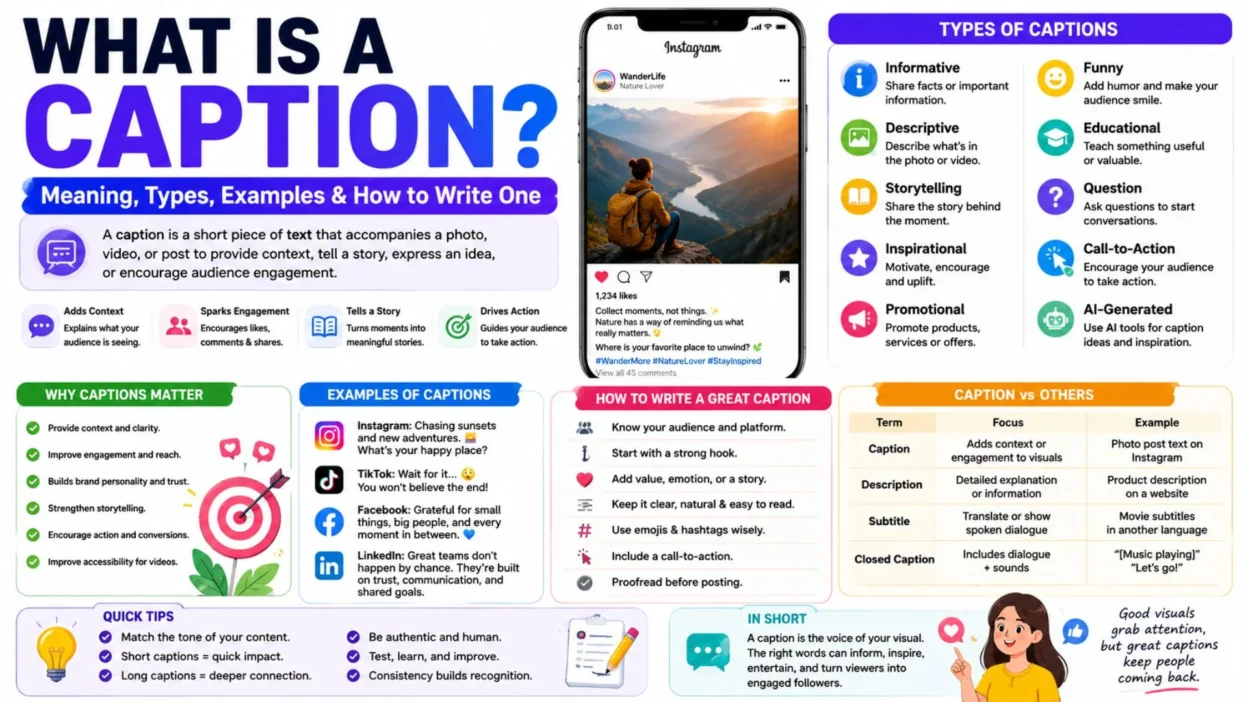
A caption is a short piece of text that accompanies a photo, video, graphic, or social media post. It can explain the visual, provide context, tell a story, express an idea, or encourage people to interact.
In simple terms:
- A caption helps your audience understand, feel, or respond to the content they are viewing.
For example, imagine a picture of a beautiful sunset.
A simple caption could be:
“Golden skies after a long day. 🌅”
The photo shows the sunset, while the caption adds an emotional idea to it.
On social media, captions can also include questions, calls to action, emojis, or hashtags. Therefore, they are often an important part of the overall post rather than an afterthought.
Simple Definition of Caption
Caption: A brief piece of text used to describe, explain, or add meaning to an image, video, graphic, or post.
The exact role depends on the context. For instance, a newspaper caption usually provides factual information, while an Instagram caption may be personal, funny, emotional, or promotional.
What Does Caption Mean in Different Contexts?
The word caption can have slightly different meanings depending on where you encounter it.
Caption Meaning in Social Media
On platforms such as Instagram, Facebook, TikTok, LinkedIn, and X, a caption is the text written with a post.
It can:
- Explain the content
- Share a personal thought
- Tell a story
- Ask a question
- Promote a product
- Encourage comments
- Add humor
- Include a call to action
For example:
- “Small steps today can create big changes tomorrow. What goal are you working toward? ✨”
This caption doesn’t simply describe an image. Instead, it gives the post a message and invites people to participate.
Caption Meaning in Photography
In photography, a caption usually provides information about the photograph.
It might identify:
- People
- Places
- Events
- Objects
- Dates
- Activities
- Historical context
For example:
- “Volunteers plant trees during the city’s annual environmental campaign.”
Here, the caption helps viewers understand what is happening in the photograph.
Caption Meaning in Journalism
News organizations use captions to give readers important facts about an image.
A journalistic caption may answer basic questions such as:
Who is shown? What happened? Where did it happen? When did it happen?
For example:
- “Firefighters respond to a residential fire in downtown Seattle on Tuesday evening.”
The goal is clarity rather than entertainment.
Caption Meaning in Video
The word caption can also refer to text displayed during a video.
In this context, captions may represent spoken dialogue and relevant sounds. This use is especially important for accessibility because viewers can follow the content even when they cannot hear the audio.
Why Are Captions Important? 📱
Now that we know what is a caption, the next question is why captions matter.
A strong caption can turn a simple visual into a more meaningful piece of content. It gives people another reason to stop, read, think, and interact.
1. Captions Provide Context
A photograph may show what happened, but the caption can explain why it matters.
For example:
Photo: A group of people standing together.
Caption: “Our team after completing six months of community projects.”
The caption gives the image a clear purpose.
2. Captions Encourage Engagement
A good social media caption can invite people to respond.
For example:
- “Which destination would you visit first? 🌍”
A simple question gives followers an easy reason to leave a comment.
3. Captions Build Personality
Your visuals might attract attention, but your words can show personality.
A brand can sound:
- Professional
- Friendly
- Funny
- Inspirational
- Educational
- Conversational
Consistency also helps an audience recognize your voice.
4. Captions Improve Storytelling
A picture captures a moment. A caption can explain the story behind it.
For example:
- “Three years ago, this project started with one notebook and a simple idea. Today, we’re celebrating our first major milestone.”
Suddenly, the visual has a story.
5. Captions Can Encourage Action
A caption can tell readers what to do next.
Common calls to action include:
- Leave a comment.
- Save this post.
- Share it with a friend.
- Visit the website.
- Learn more.
- Sign up today.
- Tell us what you think.
As a result, captions can support both engagement and business goals.
6. Captions Add Accessibility
Video captions can make spoken content easier to follow for people who are deaf or hard of hearing. They can also help viewers who are watching videos without sound.
So, captions are not only about marketing or social media. They can also make digital content more accessible.
Types of Captions
Not every caption has the same purpose. The right style depends on your audience, platform, and goal.
Here are some of the most useful types.
1. Informative Captions
Informative captions provide useful facts or explain what is happening.
Example:
- “Our new scheduling feature lets users manage multiple social media accounts from one dashboard.”
Best for:
- News
- Product updates
- Announcements
- Educational posts
- Business content
2. Descriptive Captions
A descriptive caption explains what appears in an image or visual.
Example:
- “A colorful hot-air balloon rises above the mountains during sunrise.”
These captions are especially useful for:
- Photography
- News articles
- Blogs
- Image galleries
- Educational materials
3. Storytelling Captions
Storytelling captions add experiences, emotions, or background information.
Example:
- “This was the first photo we took after opening our small shop. We had no idea how many memories would follow.”
These captions work well because they make content feel personal and relatable.
4. Inspirational Captions
Inspirational captions aim to motivate or encourage readers.
Example:
- “You don’t have to have everything figured out. Just keep taking the next step. 💫”
They are commonly used for:
- Motivational posts
- Personal brands
- Achievements
- Life updates
- Community content
5. Funny Captions 😂
Funny captions use humor to make content more entertaining.
For example:
- “Me: I’ll go to bed early tonight. Also me at 2 a.m.: one more video.”
These captions are popular with memes, lifestyle posts, and relatable content.
6. Promotional Captions
Promotional captions highlight a product, service, event, or offer.
Example:
- “Your weekend just got better. Explore our new collection and find your favorite style today.”
A good promotional caption should focus on value instead of sounding like a constant sales pitch.
7. Educational Captions
Educational captions teach something useful.
Example:
- “Did you know? Short paragraphs make social media captions easier to scan, especially on mobile devices.”
They work well for:
- Tutorials
- Tips
- Guides
- Expert content
- Educational brands
8. Question Captions
Question captions are designed to start conversations.
Example:
- “What’s one place you’d love to visit this year?”
Because people can answer directly, this format can be useful for community engagement.
9. Call-to-Action Captions
A CTA caption encourages a specific action.
For example:
- “Save this post so you can come back to these tips later.”
Other examples include:
- “Share your thoughts below.”
- “Tag a friend who needs this.”
- “Visit our website to learn more.”
- “Save this for later.”
10. AI-Generated Captions
AI tools can create caption ideas based on a topic, image, audience, or tone.
For example, you might provide:
Topic: Beach vacation Tone: Relaxed Platform: Instagram
The tool can then suggest several caption options.
However, editing AI-generated text is still important. Adding your own experiences, wording, and personality can make the final caption feel more authentic.
Caption Examples for Social Media
Different platforms often require different caption styles. Here are a few practical examples.
Instagram Caption Example
Instagram captions can combine personality, storytelling, emojis, and questions.
- “Chasing sunsets and collecting memories. 🌅 What’s your favorite place to unwind?”
This works because it combines emotion with an invitation to respond.
Facebook Caption Example
Facebook captions can be conversational and community-focused.
- “We’re excited to share a new chapter with our community. What are you most looking forward to this month?”
TikTok Caption Example
TikTok captions are often short and attention-grabbing.
- “Wait until you see what happens next… 👀”
LinkedIn Caption Example
LinkedIn captions generally benefit from a professional and informative tone.
- “One lesson I’ve learned about teamwork: strong results come from clear communication and consistent trust.”
X Caption Example
On X, concise and conversation-focused wording often works well.
- “Consistency beats perfection. What lesson has changed the way you work?”
Pinterest Caption Example
Pinterest captions can describe the content while naturally including useful keywords.
- “Discover simple social media caption ideas that can make your posts more engaging and easier to remember.”
How to Write a Good Caption ✍️
Knowing what is a caption is only the first step. Writing one that people actually want to read requires a little strategy.
1. Know Your Audience
Before writing, think about who will read your caption.
Ask yourself:
- Who am I talking to?
- What do they care about?
- What tone will feel natural?
- What should they learn or feel?
- What action should they take?
Once you understand the audience, choosing the right words becomes easier.
2. Start With a Strong Hook
The first line needs to create interest.
Instead of:
- “Here is our latest product.”
Try:
- “Looking for a simpler way to organize your daily workflow?”
The second version creates curiosity and gives readers a reason to continue.
3. Give Readers Something Valuable
A caption should have a purpose.
You can provide:
- Information
- Entertainment
- Inspiration
- A personal story
- A useful tip
- A new perspective
Even a short caption can provide value.
4. Keep It Natural
Write the way a real person would speak.
Avoid unnecessary jargon and complicated sentences. Instead, use clear language that fits your audience.
A natural caption often feels more trustworthy than one that sounds heavily scripted.
5. Add a CTA When Appropriate
If you want interaction, tell people what they can do.
For example:
- “Which one would you choose? Tell us in the comments.”
A clear CTA removes uncertainty and makes participation easier.
6. Make It Easy to Read
Large blocks of text can be difficult to scan on a phone.
Instead:
- Use short paragraphs.
- Add line breaks.
- Keep sentences clear.
- Use bullet points when useful.
- Highlight important ideas naturally.
As a result, your caption becomes easier to consume.
7. Use Emojis Carefully
Emojis can add emotion and personality.
For example:
“New goals. Fresh energy. Let’s make it happen. 🚀”
However, too many emojis can make a caption difficult to read. Use them when they actually support the message.
8. Use Relevant Hashtags
Hashtags can help categorize social media content and improve discoverability on platforms that support them.
For example:
#SocialMediaTips #ContentCreation #CaptionIdeas
Keep them relevant rather than adding a long list of unrelated tags.
9. Proofread Before Publishing
Finally, check your caption.
Look for:
- Spelling mistakes
- Grammar problems
- Broken links
- Incorrect names
- Unnecessary words
- Missing punctuation
A quick review can make your content look much more polished.
What Makes a Good Caption?
A strong caption usually has several qualities.
QualityWhy It MattersClearReaders understand the message quicklyRelevantIt connects naturally with the visualEngagingIt encourages people to keep readingAuthenticIt sounds genuine and humanConciseIt avoids unnecessary wordingPurposefulIt has a clear communication goalReadableIt works well on mobile screensActionableIt guides readers when necessary
Of course, not every caption needs every quality. A news photograph may prioritize facts, while an Instagram post may focus more on personality.
Caption vs. Description: What’s the Difference?
These terms are sometimes confused, but they are not always interchangeable.
A caption is usually shorter and often accompanies visual content to add context, personality, or engagement.
A description generally provides more detailed information about something.
Caption Example
- “Coffee tastes better with a mountain view. ☕🏔️”
Description Example
- “This guide explains how to prepare pour-over coffee, including recommended equipment, water temperature, and brewing ratios.”
In short:
Caption = context, expression, or engagement
Description = detailed explanation or information
Caption vs. Subtitle vs. Closed Caption
The word “caption” can also refer to text used with video, so it helps to understand the difference.
Caption
A broad term for text that accompanies or explains visual content.
Subtitle
Usually displays spoken dialogue, often to help viewers understand another language.
Closed Caption
Typically includes spoken dialogue plus relevant non-speech information, such as music, laughter, or sound effects.
For example:
[Music playing]
Sarah: “Let’s go!”
This provides more information than dialogue alone.
Caption vs. Hashtag
Captions and hashtags often appear together, but they perform different jobs.
A caption communicates the main message.
A hashtag categorizes content and can help users discover related posts.
For example:
- “Starting the week with fresh goals and a clear mind. ✨” #MondayMotivation #NewWeek
The first line is the caption. The terms beginning with # are hashtags.
Common Caption Mistakes to Avoid ❌
Even excellent visual content can lose impact when the caption is weak.
Writing Without a Purpose
Before publishing, know what you want the reader to think, feel, or do.
Using a Weak Opening
If the first line doesn’t create interest, people may scroll past your post.
Making Every Caption Promotional
Constantly selling can make your content feel repetitive. Mix promotional posts with educational, entertaining, and personal content.
Making Captions Too Long
Longer isn’t automatically better. Write enough to communicate the idea clearly.
Making Captions Too Short
A short caption is fine when the visual speaks for itself. However, if readers need context, add enough information to make the post meaningful.
Using Too Many Hashtags
A crowded caption can look messy. Choose hashtags that genuinely relate to the content.
Overusing Emojis
Emojis should support your message rather than replace it.
Copying Trends Without Personality
Trends can be useful, but your caption should still sound like you.
How Long Should a Caption Be?
There is no universal ideal caption length.
The right length depends on:
- Platform
- Audience
- Topic
- Content type
- Marketing goal
- Story complexity
A simple photo might need only a few words.
A personal story, educational post, or professional update may require several paragraphs.
Therefore, don’t focus only on character count. Focus on clarity, relevance, value, and audience intent.
Do Captions Help With Social Media Engagement?
Yes, captions can support engagement by giving people something to read, react to, or respond to.
For example, compare these two posts:
Post A: “Nice day.”
Post B: “Sometimes a quiet afternoon is exactly what you need. What’s your favorite way to slow down?”
The second caption creates a conversation opportunity.
That doesn’t mean every caption needs a question. Instead, the goal is to make the words support the content and encourage the type of interaction you actually want.
Can AI Help You Write Captions?
Yes. AI can help generate ideas, rewrite captions, suggest different tones, and create variations for different platforms.
For example, an AI tool can turn a basic idea like:
“New coffee shop opening”
into several styles:
Friendly: “Your new coffee spot just opened! ☕ Come say hello.”
Playful: “Warning: your coffee routine may never be the same. 👀☕”
Professional: “We’re excited to welcome our community to our new coffee location.”
Still, AI should be treated as a starting point. Adding personal details and editing the wording can make the result feel much more natural.
Quick Caption-Writing Formula
If you’re staring at a blank screen, try this simple formula:
Hook + Value + Emotion + CTA
For example:
- “Struggling to stay consistent with your content? Start with one useful post each week, focus on helping your audience, and build from there. What are you posting this week?”
Here:
- Hook: Struggling to stay consistent?
- Value: Start with one useful post each week.
- Emotion: Encouragement to make progress.
- CTA: What are you posting this week?
You don’t need to follow this formula every time. However, it can make caption writing easier when you don’t know where to start.
Quick Reference: What Is a Caption?
QuestionAnswerWhat is a caption?Short text that accompanies or explains visual contentWhere are captions used?Social media, photography, journalism, videos, education, and moreWhat is a social media caption?Text written alongside a social media postWhy are captions important?They add context, personality, storytelling, and engagementCan captions include hashtags?Yes, when relevantCan captions include emojis?Yes, when used thoughtfullyShould captions always be short?No. Length depends on the content and purposeCan AI write captions?Yes, but human editing can improve authenticityIs a caption the same as a description?No. A description is generally more detailedIs a caption the same as a subtitle?No. They serve different purposes
Frequently Asked Questions
What is a caption in simple words?
A caption is a short piece of text that goes with a photo, video, graphic, or social media post. It can explain the content, add context, tell a story, or encourage people to interact.
What is the purpose of a caption?
The main purpose is to make visual content clearer and more meaningful. On social media, captions can also build personality, encourage engagement, tell stories, and guide users toward an action.
What is an example of a caption?
For a sunset photo, an example could be:
- “Ending the day under a sky full of color. 🌅”
The words add emotion and context to the image.
What is a caption on Instagram?
An Instagram caption is the text that accompanies an Instagram post. It can contain a description, story, opinion, question, CTA, emojis, and relevant hashtags.
What makes a good caption?
A good caption is clear, relevant, authentic, easy to read, and appropriate for its audience. It should also support the purpose of the post rather than simply repeat what viewers can already see.
Are captions and descriptions the same?
No. A caption is generally shorter and focuses on context, storytelling, or engagement. A description usually provides more detailed information about the content.
Should every social media post have a caption?
Not necessarily. Some visuals can communicate a complete message on their own. However, a thoughtful caption can add context, personality, or an opportunity for interaction.
How can I make my captions more engaging?
Start with an interesting hook, provide something useful or relatable, use a natural tone, and include a question or CTA when appropriate. Also, keep the formatting easy to read on mobile devices.
Can captions improve accessibility?
Yes. Video captions can help people who are deaf or hard of hearing follow spoken content. They can also help viewers who watch videos without sound.
Can I use the same caption on every platform?
You can, but adapting the wording to each platform is often better. Instagram, TikTok, LinkedIn, Facebook, and X have different audiences and content styles.
Final Thoughts
So, what is a caption? At its simplest, a caption is text that adds meaning, context, or information to visual content.
However, a great caption can do much more. It can turn a photograph into a story, transform a social media post into a conversation, explain a video, promote a product, or help an audience connect with a brand.
The best approach is to start with your purpose. Decide what you want people to understand, feel, or do. Then choose a tone and length that fit your audience and platform.
Whether you’re writing an Instagram post, describing a photograph, publishing a business update, or adding accessibility text to a video, the right caption makes your content easier to understand and more memorable.
In short, don’t think of a caption as extra text. Think of it as the voice that helps your visual tell its story.

I am Ethan Miles, a digital creator and caption enthusiast who loves turning simple moments into powerful words. I specialize in crafting creative, trendy, and engaging captions that help your posts stand out. At Captionestry, I focus on delivering fresh ideas, relatable expressions, and scroll-stopping content for every mood and moment. I’m passionate about social media culture, photography, and the art of storytelling through short, impactful lines.